Business self-use · Updated September 9, 2026
Founding guide
A practical starting point for a business owner or an existing marketing team. Third-party agency operations are not part of this trial.
Before joining
- The business name, website if you have one, service area and primary offer.
- One concrete goal: enquiries, bookings, purchases or in-person visits, with the URL or address customers should use.
- Approved facts, brand materials and images you have permission to use. Do not upload passwords, patient records or other unnecessary personal information.
- Access to the social accounts you want to connect and a person who can review content in Discord.
Request access first if you have not arranged a trial. An invitation must be accepted using the invited email: create or sign in to your own Marketeo login, then accept the invitation. There is no temporary password. Do not create an unrelated workspace to accept an existing invitation.
Your first delivery
Confirm the workspace and brand
Use the workspace and brand selectors. In Dashboard → Brand setup, save the business facts, priority offer, conversion destination and relevant sources. Dates are optional; short-term does not mean a mandatory 30-day plan.
Connect only the channels you need
Use Channel Configuration for the selected brand. Check the account, authorization and current channel rules. A connected account is not confirmation of publishing permission or remaining quota.
Connect your Discord account from your user menu. Discord belongs to your user, not to each workspace membership. Keep Discord as the daily approval entry point.
Prepare one piece of content
Plan uses the existing plan defaults. Topic adds a specific topic, reference material and instructions. Direct starts from the text and media you provide. Inherit channels and other defaults; customize only what needs to differ. Direct still follows review, channel validation and scheduling safeguards.
Review, schedule and verify
Review the exact text and media in Discord. Approval and publication are different events. Check the approved version, destination and schedule, then inspect Dashboard or Marketing Activities for confirmed delivery. An uncertain result is not a confirmed failure: check the receipt before retrying.
Keep a useful record
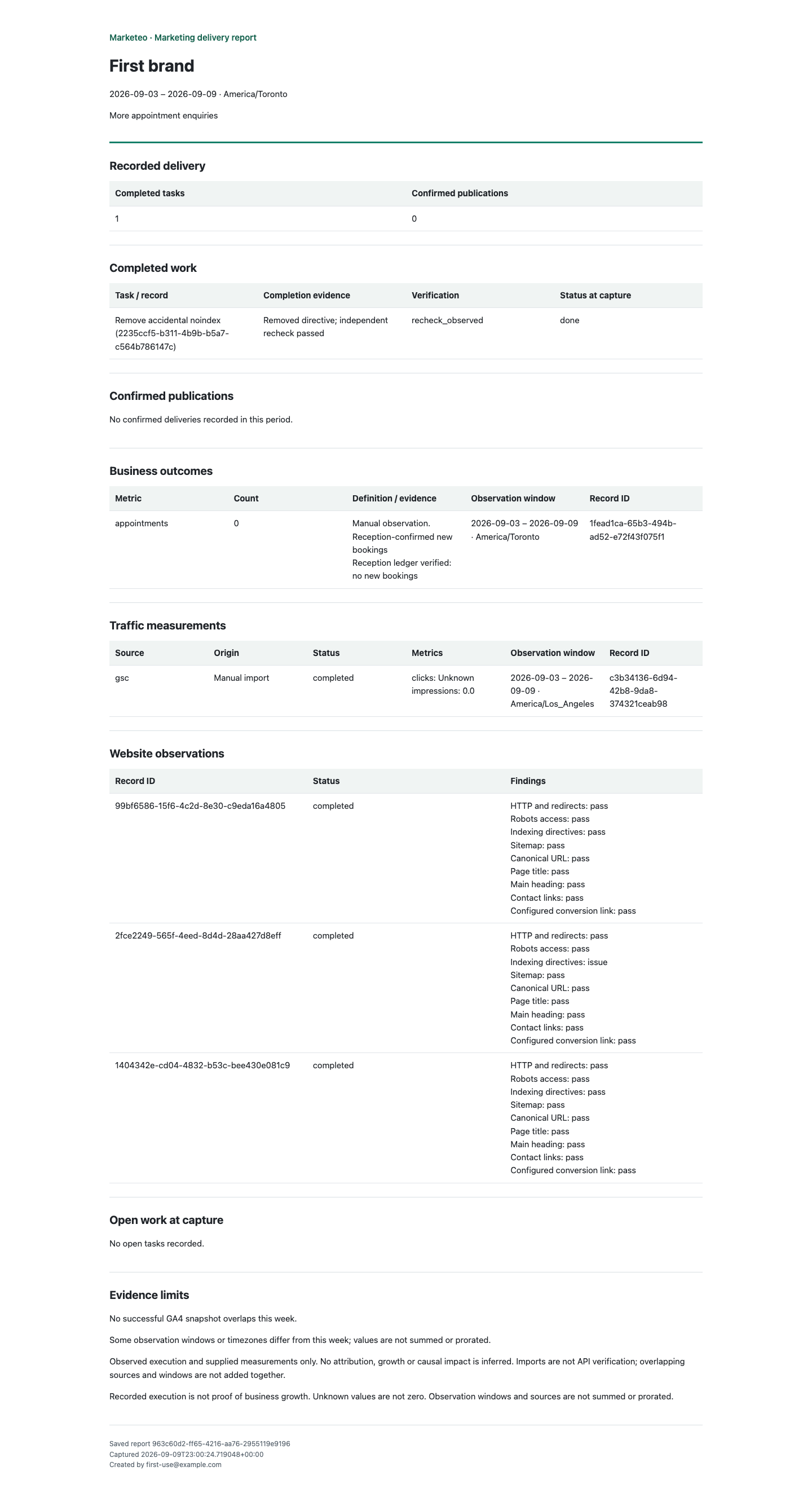
Use website checks and tasks for follow-up work. Connect your GSC/GA4 property where authorized, or use a clearly labelled import. Record real enquiries, bookings or other observations with the source and time window. Create a Weekly review and download its readable report.
Current trial limits
These are Marketeo trial boundaries, not a live status check of your accounts. Exact media and publishing rules remain in Channel Configuration; availability depends on the specific account.
- X, Facebook Pages, Instagram, Threads
- Publishing integrations are implemented. Use requires a supported, authorized account and available provider quota. Meta app permissions and business validation are not represented here as universally approved.
- Google Business Profile and YouTube
- OAuth connection work exists. They are not offered here as verified publishing destinations for this trial; API access, quota and real delivery acceptance remain separate.
- Not included as an available publishing destination.
- Website, search and business results
- Checks and recommendations do not automatically change your website, guarantee indexing or establish marketing attribution. GSC/GA4 require property access; imports are not API verification. Unknown measurements remain unknown, not zero.
- AI quality and automation
- Content and images need review. Generation can fail, and learned rules are not a guarantee of correctness. Model budgets do not include every external fee; unknown cost is not free usage.
- Pricing and trial terms
- No public subscription offer, fixed trial length, guaranteed service level or automatic upgrade is promised by this guide. Access scope and any future paid arrangement need explicit confirmation.
When something needs attention
In your brand, open Dashboard → Support. A report's Report a problem link or a health alert's Contact support link carries the source reference into the request. Include what you expected, what happened and the relevant date; do not include access tokens or credentials.
Requests and replies are visible to people with access to that brand and Marketeo platform administrators. Check progress in the app. Support requests do not automatically send Discord or email notifications, and no response-time guarantee is included.
After a reply, return to the original report or current alert and verify the result. A resolved support request does not clear the underlying alert or rewrite the report. Reopen and reply if the problem remains.
Cannot access a brand? Contact your workspace owner or support@marketeo.ai with your login email and workspace name. Do not create a second account as a workaround.
A report you can inspect
This is an actual export from an isolated demo workspace. It demonstrates completed work, unknown data and evidence limits, not customer success or measured growth.
What we want to learn together
Can your business complete useful marketing work consistently? How much time does the work and review take? Are the deliveries acceptable, and do your own records show meaningful business results? Founding use helps answer these questions; participation alone does not prove the product is effective.
Request founding access